Learn more:
In PVsell you can input a detailed power cost assessment for your project in just a few clicks. You can specify your customer's bill information in your Project's "Bill" tab or in the Library of Bills while entering a new bill to the library or editing the existing library item:
The bill information may also include separate capacity charge – which solar will certainly not affect. Treat this like a fixed charge and enter Capacity Charges (as well as other standing charges) in the "Standing Electricity Charges" section.
1. Open your project's "Bill" tab

2. Enter Capacity Charges in the respective field in the "Standing Electricity Charges" section
The pane you specify the capacity charges in is located below the "Import Electricity" section (above the "Electricity Price Annual Increase" section). Enter any capacity charges that apply for your customer in the "Capacity Charges" field.
Use the calculator function if necessary to work out simple calculations with ease.

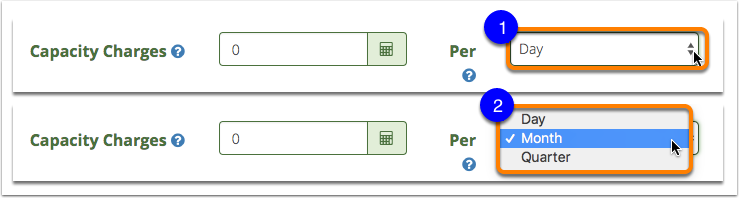
3. Specify the capacity charges frequency in the associated dropdown field
To specify how often capacity charges apply:
- click on the dropdown next to the "Capacity Charges" field,
- then set the capacity charges billing period as per "Day", per "Month" or per "Quarter".
Learn how to specify other fixed charges for your customer's bill:
0 Comments