You can input shading on the 'Site' tab. The 'Shading' section is always accessible whichever 'Solar Production Model' you select for specifying your array parameters.
Learn more about solar production models available in PVsell:
1. Open your project's 'Site' tab

2. In the 'Shading' section, select the 'Shading modelling' type
The 'Shading' section can be found below the 'Custom Map' section on bottom of the 'Site' tab. You can enter shading in two ways: Simple or Advanced.
2.1. Option 1 – Simple
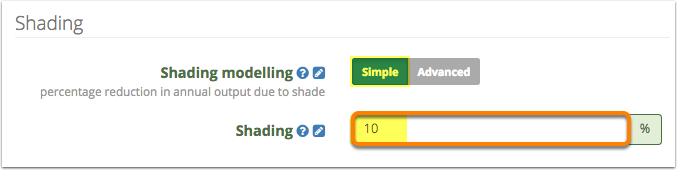
Simple shading is the quick and easy way to reduce your solar yield due to shade. Simple Shading applies a fixed reduction to solar output for every hour of the year. The net result is a percentage reduction in total solar yield. E.g. if you enter a value of '10', the total solar yield will be reduced by 10% from the unshaded solar yield, because every hour of the year the solar production will be 10% lower than if no shading was applied.
2.1.1. Select the 'Simple' Shading Modelling
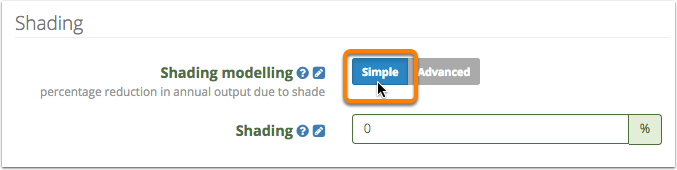
2.1.2. Enter the simple shading percentage in the 'Shading' field
2.2. Option 2 – Advanced
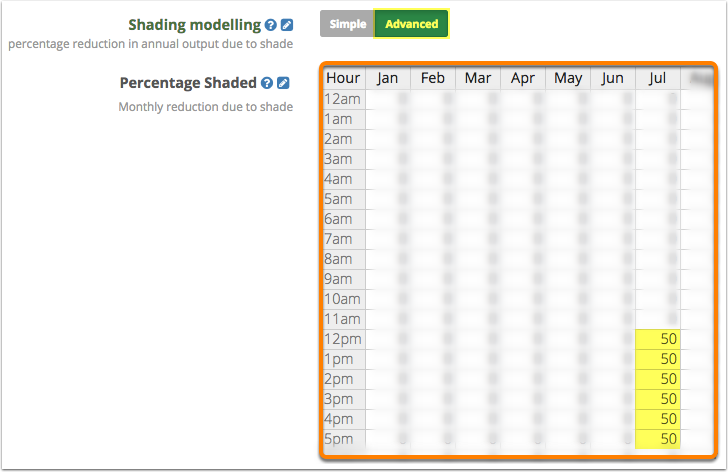
Advanced shading is the more accurate but (a bit) more time-consuming way of entering shade. The solar production will be reduced by the percentage amount you specify in particular hours of individual months. For example, if you say the system is 50% shaded in the afternoon during July between the hours of 12pm and 5pm, the solar production at other times in June, and in all other months will be unaffected. July's monthly total yield will be roughly halved, with the flow-on effect of reducing the annual solar yield by approximately 8%.
2.2.1. Select the 'Advanced' Shading Modelling
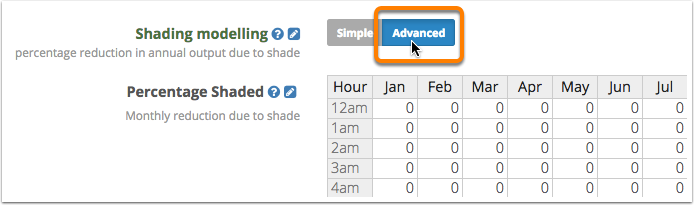
2.2.2. Enter shading amounts on an hourly basis for each month of the year
0 Comments