This only applies to 'trading/non-trading consumption profiles'.
What's the difference between Meter Data and Trading/Non-Trading Consumption Profiles?
An accurate solar ROI needs hour-by-hour consideration of energy flows. Even an hour of consumption makes a difference. Not to mention a whole half a day.
You can adjust your customer's consumption profile as to trading/non-trading times and make it a 5.5 day trading week profile.
1. Open the project's "Consumption" tab

2. Select "Advanced" for operating days per week
Since your customer works 5.5 days per week (not a standard 5 or 7 days), you need to use the advanced adjustment.

3. Specify the trading days of the week
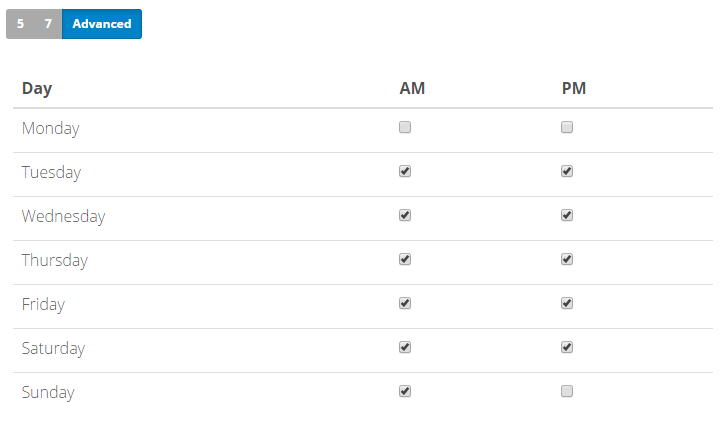
Select each day individually and check/uncheck the boxes for trading/non-trading halves of each day respectively (the AM and PM periods of the day).
For instance, in case of five-and-a-half days per week there will be 11 checked and 3 unchecked boxes (below you can see an example of consumption profile with a non-trading Monday and half-day trading Sunday settings).
0 Comments