You can easily configure your system values in PVsell. Enter or adjust the system pricing (as well as other information about your PV system), and our tool will masterfully produce accurate calculations.
Alternatively, you can save time on this page by loading system information from your library of systems.
1. Open up the project's "System" tab

2. Choose Price Type
You can quickly enter your system price at a high level, or specify prices with detailed breakdown. Choose either of the two ways respectively:

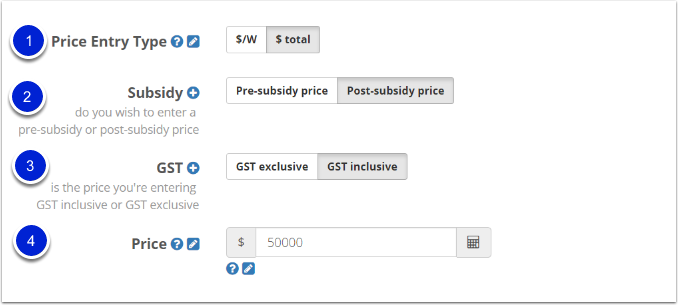
2.1. Select the type of price entry:
- $/W
Enter price in dollars-per-Watt terms
(Starting off with a $/W figure allows you to explore the financial outcome from various system sizes until you settle on the size most appropriate for the customer's consumption profile, after which you can come back and fine-tune your pricing) - $ total
Choose this type to enter price in total dollars
2.2. Choose whether you want to enter the price before subsidy or the price after subsidy
- Pre-Subsidy: If you know the system price before subsidy, use the 'pre-subsidy' option and the PVsell will calculate the net price paid by the customer by deducting the (STC) subsidy that is calculated in the next section.
- Post-subsidy: If you know the net system price paid by the customer after the subsidy is discounted, use the 'post-subsidy' option and PVsell will use this in its calculations.
2.3. Choose whether you want to enter a GST-inclusive or GST-exclusive system price
PVsell will automatically calculate the corresponding GST-exclusive or GST-inclusive system price.
Note that GST will not be added to the STC discount unless you tick the 'GST Registered Customer' box
2.4. Enter the system price
Enter the system price, accounting for:
- Your selection of whether you're entering in $/W or $ total terms
- Whether you're entering the system price pre-subsidy or post-subsidy
- Whether the price you're entering is GST-inclusive or GST-exclusive

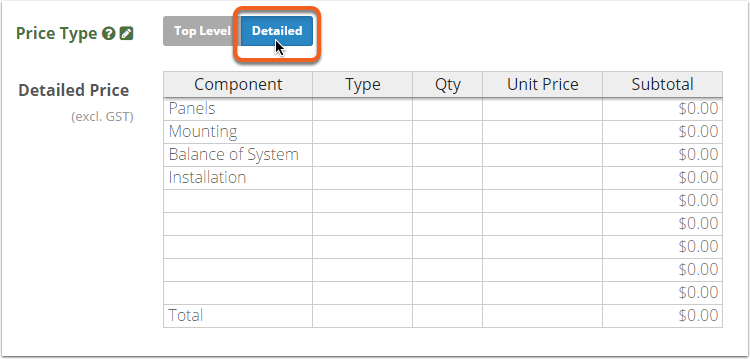
The detailed method of entering the system price allows you to specify the component prices line by line. The subtotal and total will be automatically calculated by PVcell.
This way you can build up the price, and show a price breakdown if you wish.
The Detailed Pricing input is GST exclusive.
3. Government Incentives
Choose whether to apply the government incentives of STCs, LGCs, or None.
If you entered a post-subsidy price, completing the government incentives section is optional. Even so, we recommend you do enter the Government Incentives section, for completeness - as otherwise some of your proposal merge fields (e.g. pre-subsidy system price or number & value of STCs) may not calculate or display correctly

3.1. STC
- Enter the STC price in dollars. This is the advertised (GST-exclusive) price, with a maximum of $40
- Enter the deeming period in years.
- The quantity will be automatically calculated for you automatically by PVsell.
If you entered a pre-subsidy input price, the STC value will automatically be calculated and deducted from the pre-subsidy price to determine the post-subsidy price. If you instead entered a post-subsidy input price, the STC value will automatically be calculated and added to the post-subsidy price to determine the pre-subsidy price.
The calculated STCs are based upon the customer's postcode and the array wattage.

3.1.1. GST Registered Customer
If your customer is GST registered, then check the "GST Registered Customer" box. PVsell will then add GST to the STC discount. Commercial customers therefore end up paying a slightly lower GST-inclusive price than residential (non-GST registered) customers, though the GST-exclusive system price isn't affected.
More information on the treatment of STCs for GST-registered customers is available on this Greenbank webpage.
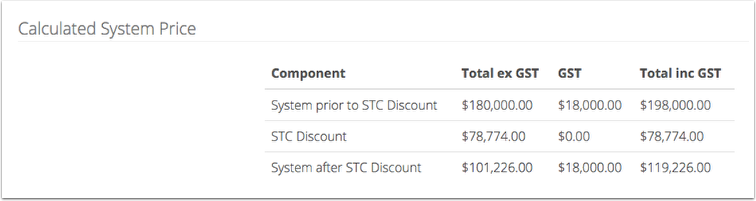
4. Check the calculated system price
Ensure all the information about your system pricing has been entered and will be processed correctly.
You can save the system values to your library and quickly load them all at once from your library next time: How do I save system information to my library?
0 Comments