This section explains how to obtain an API key if you are an end user, not an administrator, on your Nearmap account.
If you want to use Nearmap imagery in a partner application, you will need to obtain an API key from Nearmap, and then provide it to PVsell.
Before an end user can create an API key, an administrator must first create an API application. Administrators should refer to the section about Creating and managing an API Application.
For a deeper understanding of Nearmap API Keys, please refer to API Key Authentication.
- You are a Nearmap end user, not an administrator.
- You have a Nearmap account.
- You have access to a partner application – PVsell.
- You can provide the API Key you obtained from Nearmap to PVsell support.
Here are the Steps for Obtaining an API Key:
1. Log in to Nearmap
Log in to Nearmap at https://admin.nearmap.com/welcome with your Nearmap credentials.
2. Click My API Keys
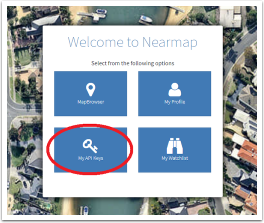
3. Choose PVsell from the drop-down list
If PVsell is not in the drop-down list, contact your organisation's Nearmap administrator. The administrator will need to Create an API Application before you can proceed.

4. Click Create API Key
The API Key will be created – it is the long string of characters in the API Key column.
5. Use the Copy button to copy the API Key, and provide your API details to PVsell support

0 Comments