Depending on the source of the meter data file - a large variety of different formats, units, data intervals.... evolved over time. We developed and improved this meter data tool over the past 5 years constantly to ensure the smoothest file upload possible - however a few conditions still apply. We've automated our tool as much as possible - commonly used file types will with specific indicators in their headings which are clearly formatted get detected and auto uploaded.
Nevertheless we highly recommend:
Before uploading any meter data into our tool - always review the file before uploading. Most common meter data formats get accepted straight away - however we can't guarantee a smooth upload for every kind of data format you are trying to upload - therefore double check the following criteria before doing so.
Your meter data file must fulfill the following criteria
1. File type
Our meter data conversion tool accepts either a CSV file or an Excel file. Processing Excel spreadsheets takes much longer than CSV files. Please be patient when dealing with Excel files.
2. Accepted data format of the interval meter data
Sunwiz meter data conversion tool can handle interval metering data in both of the commonly used formats - horizontal or vertical.
Horizonal meter data
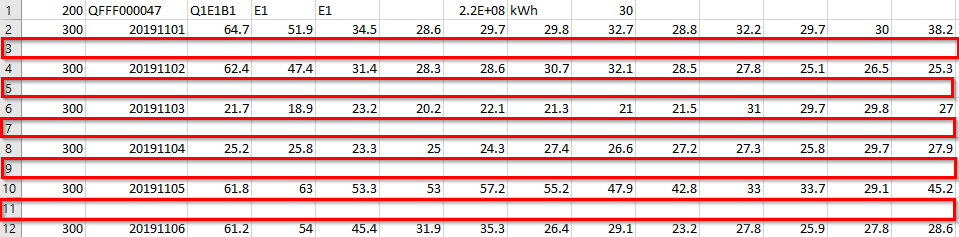
Horizontal format typically appears to show one day per line - all the individual data points for this day are in the same line.
Typical appearance of your horizontal meter data:
If your file contains 24 columns worth of data - they got recorded in 1h intervals. If it contains 48 columns worth of data - they got recorded in 30 minute increments and so on. As horizontal meter data uses a separate line for each day worth of data - a file with a full year worth of data would appear to have 365 lines full of data points. In case the dates re-start to count after e.g. 365 days (lines) it indicates several datasets in one file - see section One data set at a time in this article.

Vertical meter data
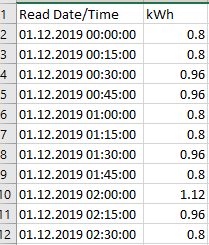
Vertical meter data typically appears to show each data point in a separate line - as a result your file contains thousands of lines.
Typical appearance of vertical meter data:
A full year worth of data in e.g. 30 min increments sum up to 17520 data point. All of this data points will appear to be below each other - every column indicates only a separate type of information such as unit, data type. In theory we only require 2 types of information from your vertical meter data file.
Date+Time - typically given in the same column, if not available in the same column we can use date & time in separate columns as well.
Consumption - typically given in kWh, can also be converted from kW, see section Accepted units.
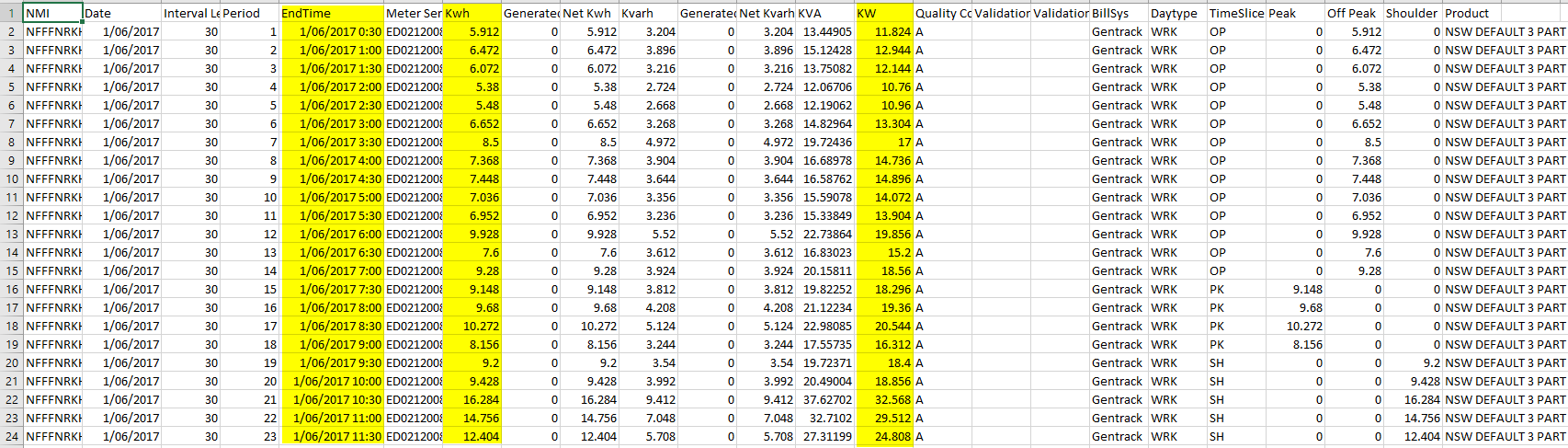
Often you'll receive your vertical meter data with X columns full of related information. If your meter data looks that way - don't worry - you can simply delete the columns with the information you don't need before uploading into our tool. Deleting the not required data - will simply result in a better organized dataset & smaller file size. The smaller the file size the faster the file can get uploaded into our tool. The yellow highlighted columns are the ones with useful consumption information.
3. Content of the file
First sheet only
It can appear your file contains several sheet with all kind of information. When uploading a file - data will be taken from the first sheet only if an Excel file is uploaded. Ensure the first sheet contains the required meter data - best to delete any additional sheet before uploading. This will also speed up the uploading process.
Accepted intervals
Meter data data points have to be at least!!! available in 1h intervals. The file may include a finer granularity of 30 min or 15 min increments - in this case our conversion tool will automatically aggregate your data into hourly blocks.
Accepted units
Your data gets accepted and converted in at last an hourly breakdown of consumption by W, kW or kWh. In case your data gets supplied in Wh (rather than kWh) - each data point has to get divided by 1000 (conversion into kWh) via excel formatting before uploading into our tool.
Full year worth of data highly recommended
It's highly recommended to upload at least a full year (365 days with) worth of metering data - in order to ensure maximum accuracy of the data. If your meter data file contains more than a full year worth of data our tool will only consider the latest 365 days and ignore the previous ones.
Less than a full year worth of data available
Don't worry if you can't access a full year worth of consumption data. This typically happens if your customer recently changed providers or moved their office/operating venue. If this is the case we require at least one full month worth of data - simply upload this data and extrapolate the missing data within our tool.
Important:
If you extrapolate missing data of a meter data file (even if it's only one month worth of data which was missing) - the consumption profile converts from meter data into an editable profile. An editable consumption profile won't reflect the consumption patterns as closely as real meter data.
- What's the difference between "editable" and "meter data" Consumption Profiles?
- Can I upload less than a full year's worth of interval metering data?
One data set at a time
Our tool only accepts only one data set at a time. Often it gets overseen or ignored that a meter data file contains more than one dataset. These are typically lined up in horizontal meter data files below each other - e.g. E1 = X lines of data, after X lines of data there's typically another header indicating the next data set e.g. E2 and so on.
A typical indicator for the power or energy dataset we are looking for E1. As the number indicates there's even a chance for a E2, E3 .... dataset. If this is the case - it can typically be seen straight in the first line of the file. The snapshot below shows the first line a horizontal meter data file. In column 3 you can see Q1,E1,B1. This indicated several different datasets in this file. E.g. B1 = Reactive power, E1 = Active Power (Energy). In column 4 you can see E1 which is the header for the first data set of the file. The following datasets Q1 & B1 - which typically start after the end of E1 (indicated through new beginning of the data + header)have to be deleted before uploading.

In any case - we recommend scrolling through the file before uploading - ensuring only one data set is present. Look out for headers indicating the beginning of another dataset or simply the number of lines given in the file. E.g. does the data start all over again in line 366? That would be a strong indicator for a second dataset.
Summing up E1,E2,E3 datasets before uploading into our tool
What to do if your excel file contains several E (Energy) datasets? E.g. E1,E2,E3? That's typically an indicator your customer currently uses 3 different energy meters on side. As every meter is operating individually, data points are only getting recorded into one file - not summed up.
In theory you should create a separate analysis for each meter & dataset individually. However as this is only an technical aspect and your customer most likely won't be happy to receive 3 individual quotes for his solar system - you could sum the data points up into one dataset before uploading into our tool. This has to be done via excel formatting.
Empty spaces between data points are NOT allowed
There's a chance your meter data gets supplied with an empty line as a space between the days. In this case our tool is not capable to interpret the empty lines accordingly. Therefore - remove every empty line via excel formatting before uploading into our tool.
4. Receiving support if you struggle to interpret/upload the accurate data
We crated a rich library full of help articles - covering typical FAQ's with instructions on how to upload your meter data and discussed in this article the accepted meter data formats in detail. To access the help Articles, just press on  . You find it on the top right corner of the header.
In case you still struggle to interpret your customers meter data file properly e.g. indicating the accurate dataset (if several available), require formatting of the file before uploading, unsure what kind of data you require or simply don't have time to read through our help content - we are providing project/file specific support for a fee.
We are aiming to keep the costs of this tool as low as possible - to make it accessible to the whole solar community. Therefore we can't provide project case specific support for free. Thanks for your understanding.
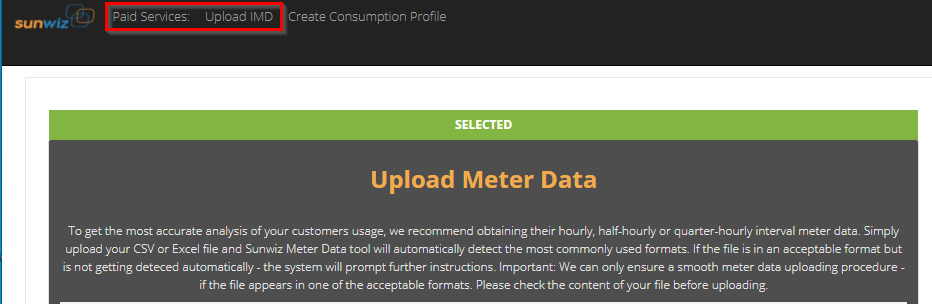
Please request meter data assistance using our paid service Upload IMD in the header of our tool.
0 Comments