Learn how you can add a page or a PDF file to your Proposal Template:
This article describes the process of renaming a proposal page within your Proposal Templates. You can also rename a Proposal Page within your Current Proposal – and you do that the same way as described below except that you open your Proposal directly in your Project (project's 'Proposal' tab) and hover over the page you wish to rename there, and then do exactly as described in Steps 6-9 of this manual.
Remember that you cannot edit a PDF file in the Page Maker. Make sure to update the PDF on your PC and then upload the latest version or to a Proposal Template (or to your customer's Proposal).
1. Click on the Libraries icon in the main menu (side menu on the left)

2. Open the 'Proposals' tab

3. Select the Drive where the necessary Proposal Template is stored
Click on the necessary drive in the 'Current Drive' dropdown. The current drive is marked with a tick in the list of drives.
Remember you can modify any page in any Proposal Template in 'My Drive' (and in 'Company Drive' provided that you have admin rights). To rename a Proposal Page in a template provided by PVsell, copy the necessary page from the 'PVsell Templates' drive to 'My Drive' first.

4. Click the Edit icon next to the Proposal you wish to rename a Proposal Page in

If you wish to keep both versions of the Proposal Template (for example, the current version you have in the library, and the modified version you will have after renaming a Proposal Page in it), you can first click the Duplicate icon next to the Proposal Template you wish to rename a Page in, and then click the Edit icon to rename a Proposal Page in one of the duplicates.

5. Hover over the Page you wish to rename
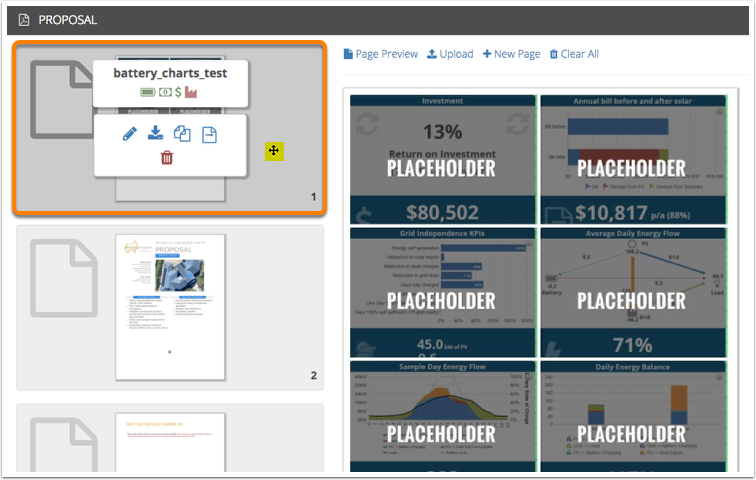
6. Click on the edit icon

7. In Visual Composer, edit the name of the Page

8. Click 'Save and Close' when done renaming
Or click 'Save and Continue' to perform a progressive update of the saved version, or click 'Close without Saving' to cancel the changes and revert to the most recently saved version.

9. Reload the tab/page in your browser. Done! The Proposal Page has been renamed

0 Comments